Can my PC run Scary Game 2?
Steam lists a light minimum spec: Windows 7 / 10 / 11 64-bit, dual-core CPU, 5 GB RAM, integrated graphics, 5 GB storage, and onboard sound. In practice, Windows 10 or 11 with extra RAM headroom is the safer target.
Official-source buying guide
Use this Scary Game 2 Steam guide before you wishlist, buy, or research The Mad Shepherd. It separates confirmed Steam listing details from fan assumptions, points you to the official store page, and gives you a practical PC readiness checklist without sending players to unofficial downloads.
Source basis: the official Steam listing for Scary Game 2: The Mad Shepherd, checked on 2026-06-07. Store details can change, so verify price, reviews, languages, and requirement text on Steam before purchase.
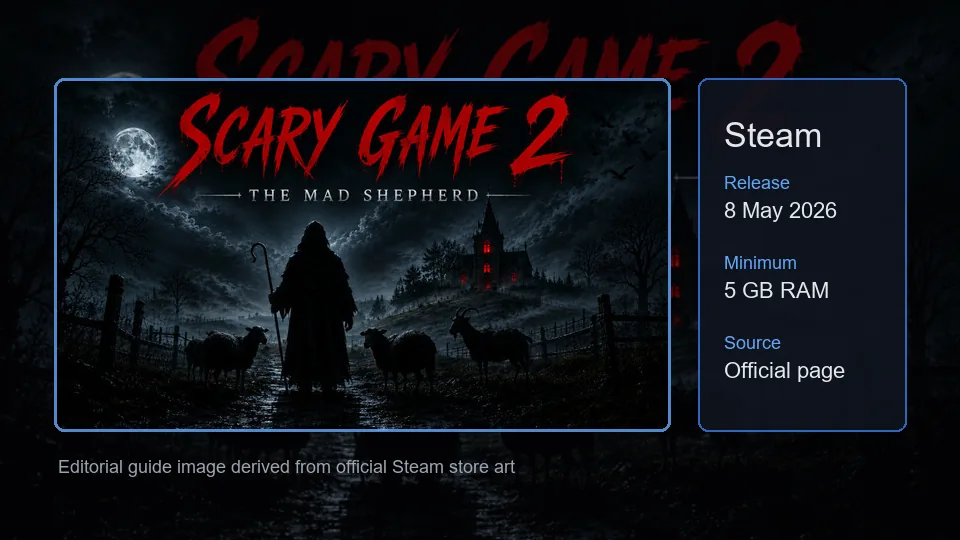
The Steam page is the safest source for transactional details. This summary keeps the key buying signals visible while avoiding unsupported download mirrors or copied store controls.
The official Steam app name identifies the specific game covered by this fan wiki.
Steam lists this release date on the store page; regional formatting may vary.
Use the Steam developer link when you need publisher or creator context.
This site does not host downloads, APKs, cracked builds, installers, or mirror links.
Steam exposes a ten-achievement structure, covered separately on the achievements tracker page.
Steam tags also include dark comedy, walking simulator, psychological horror, and adventure.
These answers target the most common store-check questions from recent Search Console data. Use them as a fast filter, then open Steam for live purchase and install details.
Steam lists a light minimum spec: Windows 7 / 10 / 11 64-bit, dual-core CPU, 5 GB RAM, integrated graphics, 5 GB storage, and onboard sound. In practice, Windows 10 or 11 with extra RAM headroom is the safer target.
The Steam listing identifies KanGames as the developer for Scary Game 2: The Mad Shepherd. Treat Steam as the source of truth if publisher, developer, or store metadata changes.
The verified route covered here is PC via Steam. This wiki does not provide APK files, cracks, launchers, mirrors, or console download links.
Use the official Steam listing for account ownership, updates, achievements, refunds, regional pricing, and install controls. Avoid third-party pages that promise free keys or installers.
For Scary Game 2 searches, Steam is the strongest destination when the question is about release status, price, download safety, reviews, screenshots, trailers, achievements, or system requirements. A fan wiki can help you interpret those details, but the store page is still the place where purchase controls, account ownership, refund policy, regional price, and installed files are handled.
The Mad Shepherd is presented on Steam as a first-person horror adventure with puzzle and walking-simulator signals. That matters because some players searching for Scary Game 2 may actually be looking for generic two-player scary games, browser horror games, or free horror lists. This page is intentionally narrow: it covers the Steam listing for Scary Game 2: The Mad Shepherd, not every game with a similar phrase.
Use this guide when you want a pre-purchase pass. Check whether your PC meets the minimum requirements, confirm the release date in your region, inspect the official screenshots and trailer, and decide whether the tone fits what you want from a horror game. Then move to the walkthrough, achievements, or wiki roadmap only after you know you are looking at the right game.
Steam currently lists only a lightweight minimum spec block. Treat it as a baseline, then leave extra room for recording, high-resolution displays, overlays, or future patches.
| Requirement | Steam-listed minimum | Practical note |
|---|---|---|
| Operating system | Windows 7 / 10 / 11, 64-bit | Steam also notes that the Steam Client supports Windows 10 and later from January 1, 2024, so Windows 10 or 11 is the safer practical target. |
| Processor | Dual Core Processor | A dual-core CPU may launch the game, but close background apps if you are on an older laptop. |
| Memory | 5 GB RAM | Plan for more usable RAM if you keep Discord, browser tabs, capture software, or streaming tools open. |
| Graphics | Integrated | Integrated graphics are listed, but horror games rely on lighting and readability; test graphics settings if scenes look too dark or unstable. |
| Storage | 5 GB available space | Keep extra disk space for saves, shader caches, updates, screenshots, and Steam verification files. |
| Sound card | Onboard | Use headphones if you want to catch audio cues, but verify volume and accessibility settings before a first run. |
Run through these checks before you commit money or time. They are simple, but they prevent most confusion around wrong pages, old requirements, and unofficial download traps.
Make sure the store page says Scary Game 2: The Mad Shepherd and not a generic horror collection, multiplayer scary-game list, or unrelated browser game. Similar phrases can overlap in search results.
Entity matchSteam can vary price, availability, mature-content gating, and review visibility by region or login state. Use the live store page for final purchase details rather than a cached fan snippet.
Store freshnessThe listed minimum is modest, but a better experience can still depend on display brightness, stable frame pacing, audio clarity, and whether you run overlays or recording software.
PC readinessInspect the Steam trailer and screenshots before relying on reposted clips. Official media is the safest way to judge tone, camera perspective, puzzle style, and visual comfort.
Media accuracyIf a page promises a free Scary Game 2 APK, crack, launcher, or mirror, treat it as outside this wiki. Use Steam for account ownership, updates, achievements, and refunds.
Download safetyGame-site articles should prioritize real first-party media. This page uses a local editorial WebP derived from official Steam store art, while purchase controls and live screenshots remain linked to Steam.
After the Steam check, move to the page that matches your next question instead of mixing purchase, guide, and completion intent on one page.
Decide whether the short solo horror, puzzles, tone, and scope fit you before buying.
Read the reviewTrack the ten Steam achievement slots with a local checklist and spoiler-aware planning notes.
Open achievementsReturn to the homepage route plan for chapters, puzzles, checkpoints, and future walkthrough organization.
Open walkthrough planUse Steam for live price, reviews, screenshots, trailers, install controls, and store-account actions.
Open SteamShort answers for players checking release status, requirements, downloads, and official sources.
Yes. Scary Game 2: The Mad Shepherd has an official Steam listing. Use that page for the current release status, price, media, reviews, achievements, and install options.
The Steam listing checked on 2026-06-07 shows 8 May 2026. Always verify on Steam because date formatting, regional display, and store updates can change.
Steam lists Windows 7 / 10 / 11 64-bit, a dual-core processor, 5 GB RAM, integrated graphics, 5 GB available storage, and onboard sound. Windows 10 or 11 is the safer practical target for the Steam Client.
No. ScaryGame2.blog is an independent fan wiki and does not host installers, APKs, cracks, mirrors, or game files. Use Steam for official downloads and account ownership.
No. This guide summarizes store-check steps and PC readiness. Steam controls live reviews, refund policy, regional price, mature-content gates, and account-specific purchase options.
The Steam listing identifies KanGames as the developer of Scary Game 2: The Mad Shepherd. Use Steam for the latest developer and publisher metadata.
This guide only verifies the PC Steam route. Do not treat APK, mobile, console, keygen, or mirror pages as official unless the developer or Steam links to them.